The major workplace platforms now offer an AI workflow builder to employees, not only to your developers, wherever your administrators switch it on. A person in customer service, purchasing or accounts payable can describe a task in plain words and get an agent that reads, drafts and sorts, and in some tools, sends. The large suites already ship them: an employee builds an agent in the chat window they use every day, or describes a multi-step workflow without code. Workflow vendors are following, in limited release, with builders where staff describe the task, pick their tools and deploy, inside limits an admin sets.
That is good news for your operations. The people closest to the work know its exceptions, its workarounds and the twenty minutes it wastes every morning. Until now, that knowledge waited in a queue behind larger engineering priorities. Your people already bring AI to their work. In a 2024 survey of 31,000 people in 31 countries, 75% of knowledge workers said they used AI at work, and 78% of those users brought their own tools to work.
The risk is not that your people build. It is that nobody decided which of their workflows may run alone. The question for you this quarter is narrow: which workflows may your staff automate by themselves, which need a second look, and which do you engineer and own?
The one who loses the hour can remove it.
Three Tiers, Three Answers
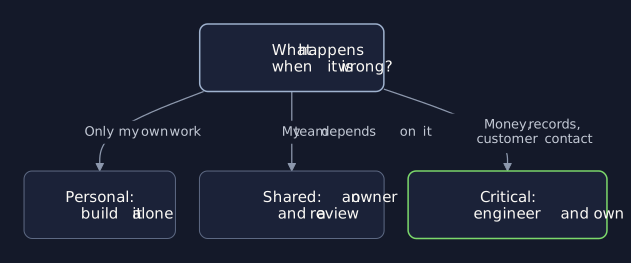
Sort every workflow your people want to automate by what happens when it is wrong:
Critical. It moves money, changes a record of truth or contacts customers. You engineer it.
Shared. A team depends on it, or it reads customer data. It gets an owner and a review.
Personal. Their own steps and data, easy to undo. They can build it alone.
When a workflow fits more than one tier, the higher tier wins.
Four Questions That Sort Them
Your people can answer four questions on their own, in a minute, before they build:
Who else depends on it? If anyone but the builder would notice it stop, it is shared.
Can it be undone? A draft can be deleted; a payment, an order or a sent email has effects on people outside the company that are hard to reverse once they land.
What does it touch? Reading customer data makes it shared; changing money or a record of truth makes it critical, whoever built it and however small it looks.
Does it act or suggest? An agent that drafts for a person to approve is lower risk than one that sends, pays or changes a record on its own, without a check.
Much of what your people want to build can be personal: summaries, drafts, reminders, sorting their own work, on data only they use. That tier needs no committee. It needs a short list of approved tools and data, and the freedom to try what might help.
What A Review Looks Like
A review that takes three months kills the idea; one that takes three days improves it. For a shared workflow, ask for these five things before it goes live for the team:
The access it needs and no more, granted to the workflow, not borrowed from its builder.
A retirement rule: who switches it off when the process changes or the owner leaves.
A short test of real cases with known answers, before launch and after each change.
A named owner who fixes it when it breaks, and a second person who understands it.
A record of what it did and why, so anyone can check a result after the fact.
The platforms already give you the switches. In one suite, an agent an employee publishes needs an administrator's approval before the whole company can use it; in another, you choose whether sharing an employee's agent requires review. One vendor's guidance sorts employee-built tools by criticality, so critical ones get guardrails without stifling the rest.
Where It Improves Your Operations
The gain is not the tool. It is that the person who loses an hour a day to a task can now remove it, and your engineers spend their time on the critical tier instead of on small requests. The upside is measured, if narrowly. In a study of 5,179 customer support agents, an AI assistant raised issues resolved per hour by 14% on average and by 34% for novice and low-skilled workers, with little gain for the most experienced and highly skilled workers.
Your best signal comes from the shared tier. When three teams build the same workflow on their own, you have found a process worth engineering properly, once, for the whole company, with the owners, tests and records it deserves from its very first day.
What To Watch
Workflows nobody owns. The builder moves on, and nobody answers for it.
Copies. Five versions of one report, each with its own errors and rules.
Personal turned shared. One person's tool a whole team now relies on.
That vendor's guidance names two of these problems: tools built for personal productivity can become widely adopted or business-critical, which it says "requires management", and when a builder leaves the company, their flows are "in effect owner-less".
First Steps This Week
List what already runs. Ask each team what it built, and who owns each one.
Sort them into three tiers. Anything critical gets an engineer.
Publish the rules. Approved tools and data; reviews in days, not months.
Bring Your List
A fifteen-minute call sorts the workflows your people have already built into the three tiers and names the one worth engineering first. Sometimes the answer is to leave most of them alone and let your people keep improving them; you will hear that plainly.
Where a workflow has become critical, Engineering rebuilds it with owners, tests and records your auditors can read, and your people keep improving the parts they understand best. Where you want a standing second opinion on what your teams build, Advisory gives you one.