THE BRIEF
Share the mechanism, own the policy
Keep how things are done in one shared core, and keep what each company decides on top of it as versioned settings, with every change tested before its own teams use it.
Your three steps this week
- Pick one handoff between two departments that no system owns.
- Write down its mechanism: who may act, where the record lives, what gets logged.
- Write down its policy: the approvals, limits and routing that are yours alone.
Sources
- METR, Measuring AI Ability to Complete Long Tasks
- OWASP Top 10 for Agentic Applications 2026
- Linux Foundation, Agentic AI Foundation
Your marketing, sales and support teams each bought their own AI tool. None of those tools knows what the others did, so your staff copy customer data between screens, and a fix made in one tool helps none of the others. The alternative is a company operating system: one shared core that every department's agents run on, with your own way of working kept on top of it as settings you can change and test without touching the core.

What a company operating system does
Central platforms have a familiar story: years of build, and the departments keep buying their own tools anyway. That is what happens when you centralize the wrong layer: the screens and the decisions. Here the shared part is the layer underneath. Marketing, sales, operations, engineering and support work from the same records, under one permission system.
The systems you already run, such as accounting and ticketing, keep their own data; the core holds the timeline that links them. Designed well, the same core can run more than one company: every business in your group or portfolio, each with its own workflows.
Why you can build it now
Three things changed. Agents can now attempt much longer tasks on their own: on one research group's tests, the length of the tasks agents finish half the time, measured by how long those tasks take a person, doubled about every seven months from 2019 to 2025. That makes a cross-department workflow worth testing in your own business. There is now an open standard for connecting agents to your systems, the Model Context Protocol, governed by a neutral foundation since December 2025, with more than 10,000 published connectors. And the security community published its first top ten list of risks specific to agents, so the failure modes are named and can be designed against from the start.
Separate mechanism from policy
The parts exist; the architecture is the hard part. The best guide is an idea from operating system design in the 1970s: separate mechanism from policy. Mechanism is how things are done: how an agent proves who it is, how a record is stored, how an action is logged. Policy is what you decide should be done: who approves a discount, when a ticket goes to a person.
The core holds the mechanisms. Each department's workflows are policy, and in a group, each company's workflows are policy too. That is the rule: share the mechanism, own the policy. Copy the core to change how one business works, and you maintain every copy: fix a bug, and you fix it in each copy. Keep the core shared and each company's policy in configuration, and one fix reaches every company after it passes each one's own tests.
Economists call the gain economies of scope: once the shared part is built, adding the next workflow usually costs less than building it alone. If your departments share almost no records and no connectors, there is no scope to economize on at all.
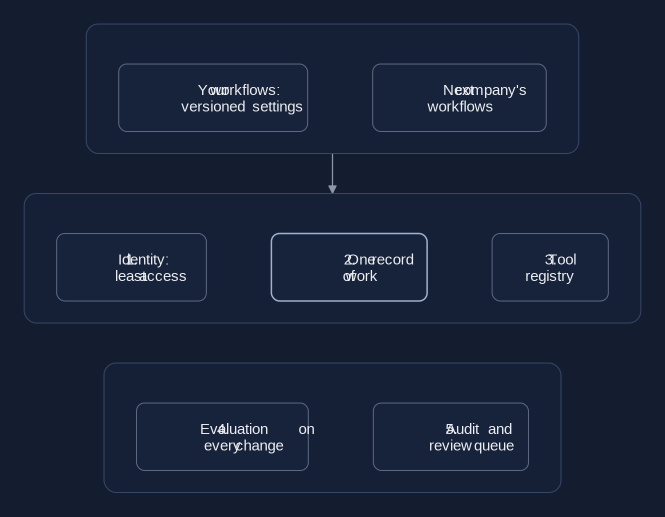
Five mechanisms in the core
- Identity. Every person and agent has its own login and the least access it needs.
- One record of work. Each customer, order and ticket is one timeline for every team.
- A tool registry. Every connection to an outside system uses one standard interface.
- Evaluation. Each workflow has its own test cases, and they run on every change.
- Audit and review. Every action is logged; actions you mark wait for a named person.
With the registry in place, connecting a system is mostly configuration when its tested connector already supports the operations and records you need; otherwise budget for integration work. Three things always need testing: how its records map into the shared timeline, its permissions and its failure handling. Build each mechanism as deep as your first two or three workflows need, prove those, and add each new workflow as policy.
Contain the risk of one shared core
The agent security list names cascading failures among its ten risks, and a shared core concentrates that risk: one bad change could take marketing, sales and support down together, where separate tools fail separately. You pay to contain it. Every workflow's test cases gate every change to the core, and core changes roll out in stages, one department or company first, with a way back to the previous version that passed every test.
Each workflow also keeps a manual path you rehearse. The records stay in your accounting and ticketing systems, open steps are mirrored there, and people reconcile before automation resumes. That path keeps orders moving on the day the core stops.
One customer, one timeline
The marketing workflow scores a lead. A sales agent drafts the first message, and a person approves it. Operations opens the order on the same record. When the customer opens a ticket, the support agent sees the order, the promises sales made and every earlier ticket.
Today those are separate tools that do not talk. Conway's law, from 1968, describes the pattern: organizations design systems that copy their own communication structure. Buying follows the same path: each department buys for its own work, and the tools keep the departments apart. One shared record can break that loop, once someone owns each workflow that crosses departments. Without that owner, the system gets routed around.
Keep each company's data apart
When several companies share one core, one bad query must never show one company another's customers. Two common patterns, silo and pool, cover most cases. Silo gives each company its own database and dedicated resources: the stronger boundary of the two, provided access is enforced across the whole system, and usually the higher cost. Pool shares a database, and every row carries the company's identifier, enforced by the database itself rather than by application code, so one missed filter cannot leak a row.
You choose per type of data. Health or payment records usually belong in a silo with its own credentials, while your routine operational data can pool. Whichever you choose, scope credentials, tools and agents to one company too, not only the database. An agent's memory, the notes it keeps between tasks, is never shared across companies: that security list names memory poisoning as a top risk. One planted false note can steer any later decision that retrieves it. Scope memory to one company and one workflow, keep it where people can inspect it, and make sure it can be wiped the day a company leaves your group.
Change a workflow without a ticket
A central platform slows departments down when the central team owns policy; the split exists to prevent that. Each workflow is a versioned definition: its steps and tools, its thresholds, and who approves. Your marketing lead edits her own workflow's definition and its test cases within the permissions and approval limits the core enforces, the tests run, and the change goes live without a ticket to anyone. Raising those limits still takes a separate approval. Expect the first months to be slower, while those definitions get written.
Keep the tools that work
The AI tools you bought last year need not go. A tool that does its job well connects to the core, your staff keep the screens they know, and its results land on the shared record. Retire it only once everything it does runs as a workflow on the core, at least as reliably.
When a shared core pays
If you run one department with one workflow, buy a good tool and stop there. Otherwise, run the cost test. Count what duplication costs you over the period you would run the core: the hours your staff spend re-keying between tools, the same connector built once per tool, the same fix repeated per company. A shared core pays when the part of that total it removes is larger than building the core, migrating to it and running it over the same period. If it passes, write the first page below, then build only what your first workflows need.
What this design leaves open
Three questions sit outside this design, and you should still ask them before you commit. How do you move years of data out of the tools you run now? Who staffs and funds the team that owns the core? And how do each company's auditors examine a shared system?
The first page to write
- Pick one handoff. Two departments pass work across it, and no system owns it.
- Write down its mechanism. Who may act, where the record lives, what gets logged.
- Write down its policy. The approvals, limits and routing that are yours alone.
That page is the first specification for your core.
References
- METR. Measuring AI Ability to Complete Long Tasks. Published 2025-03-19; updated in Time Horizon 1.1, 2026-01-29.
- The Linux Foundation. Linux Foundation Announces the Formation of the Agentic AI Foundation. Published 2025-12-09.
- OWASP GenAI Security Project. OWASP Top 10 for Agentic Applications 2026. Published 2025-12-09.
- Wulf, W., Cohen, E., Corwin, W., Jones, A., Levin, R., Pierson, C., & Pollack, F. HYDRA: The Kernel of a Multiprocessor Operating System. Communications of the ACM 17(6), 1974.
- Panzar, J. C., & Willig, R. D. Economies of Scope. American Economic Review 71(2), 1981.
- Conway, M. E. How Do Committees Invent? Datamation, April 1968.