Picture a company of a few hundred people that has put AI agents to work; this is an illustration, not a client story. Support runs one that drafts replies, finance one that matches invoices, and IT one that closes routine tickets. Each was built by a different team, with its own access and its own bill. Ask who owns each one, what it can read, change or send, and how to stop it today, and the answers may take a week to collect.
If that sounds familiar, many companies are in the same place. Citing Gartner, a technology vendor's October 2026 release reports that only 13% of organizations believe they have the right AI agent governance in place. Governance is one gap; cost is the other. In its AI trends for IT operations in 2027, Gartner predicts that through 2027, enterprises running AI agents in IT operations on uncapped pricing tied to token usage will exceed their initial cost expectations by more than 50%, compared with organizations on predictable subscription and bundled pricing.
Agents are worth running when they earn their cost: they take routine work off your people. The question for you this quarter is narrow: does every agent that acts for your company have an owner, an off switch and a budget, and do you own the ones that run your core workflows?
Every agent has a name beside it.
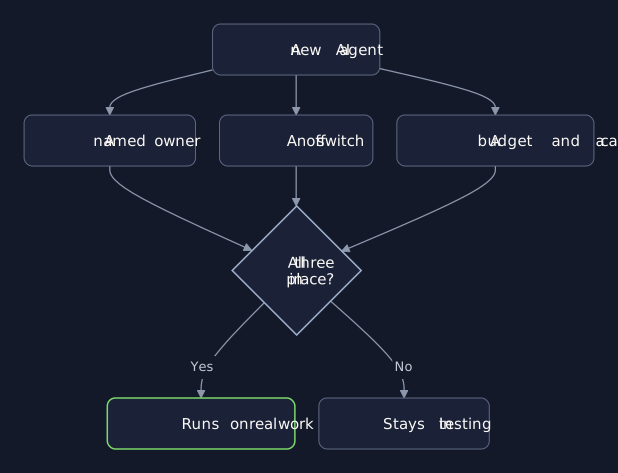
Three Things Before Any Agent Runs
Give every agent three things before it touches real work:
An owner. One named person who answers for what it does, with a record of its access.
An off switch. One action that stops it, and a person allowed to use it.
A budget. A cost per unit of work, and a cap per workflow that stops or alerts.
An agent missing any of the three stays in testing, however well it performs.
An Owner Who Can Answer
The owner is the person you call when the agent does something unexpected. Write down, for each agent, what it reads, what it may change and what it may send, and give it its own credential rather than one borrowed from the person who built it. When the owner moves on, a new owner is named that week, or the agent stops.
Some vendors now ship building blocks for exactly this. The same October release describes a service that records each agent's owner, lifecycle status and granted authority, and credentials that are short-lived, limited to what each agent needs, and revoked in real time when an agent attempts an unauthorized action. Use what your platforms give you.
An Off Switch You Have Tried
An off switch you have never pressed is a guess. Decide who may stop each agent, how work in progress is handed back to a person, and how long that takes. Then press it once, on purpose, before the agent goes live. The release above also describes a kill switch for any agent and sandboxes that keep one agent from interfering with others; the principle holds whatever tools you use.
A Budget Per Workflow
A pilot's bill tells you little about production. Agents are often priced by use, and an agent that works through several steps can use far more tokens than a single answer, so the bill grows with volume, not with seats. Set the budget in your own terms:
A unit cost. The cost of one resolved ticket, one matched invoice or one drafted reply.
A cap per workflow. A daily or monthly limit that pauses the agent or alerts its owner.
Telemetry from day one. Gartner recommends a strict "no telemetry, no deployment" policy.
When the unit cost rises, you see it in a week, not at the end of the quarter.
Build Your Core Agents In-House
The agents that run your core workflows encode how your company works: which exceptions matter, who approves what, and what a resolved case is worth to you. Those are the agents worth building in-house, with experienced engineers beside your team, so that your people understand them, own them and can change them as the work changes. Platforms and models are good building blocks; rent them, and keep the workflow logic, the access rules and the budget decisions in your hands.
Tools To Manage Them
As the number of agents grows, a spreadsheet stops being enough. You need a small set of tools built around your workflows:
A register. One row per agent: owner, purpose, access, status, unit cost, cap, last review.
A cost view. Spend per workflow and per unit of work, each week, beside the value it delivers.
A control panel. Pause any agent in one action, and see what it was doing.
Some of this you can buy, and should. The part that knows your workflows, your approvals and your budgets is usually worth building, because those decisions stay with your people.
When To Wait
If nobody can list what already runs, hold back on new agents. Take the inventory first; every decision after it is easier.
First Steps This Week
List every agent. Ask each team what it runs, what it can touch, and who owns it.
Name an owner for each. No owner by Friday, and the agent pauses.
Set one unit cost and one cap. Start with the agent whose bill grew fastest.
Bring Your List
A fifteen-minute call goes through the agents your teams already run and names the one that needs an owner, an off switch or a cap first. Sometimes the answer is that your controls are already enough; you will hear that plainly.
Where an agent runs a core workflow, Engineering builds it with your team, along with the register, cost view and controls to manage it, so you own both. Where you want a standing second opinion on what your teams deploy, Advisory gives you one.