Three of your managers may pay for an AI agent that sits in team chat, reads their email and drafts the next message before anyone asks. Picture a company of 150 people; this is an illustration, not a client story. The teams like it, and it runs on personal cards. Nobody in operations knows it exists, what it can read, or whose name is on what it sends.
That can happen now. In early November, a search company released always-on agents for ongoing work. Its announcement says they monitor ongoing work, follow up as things change, and act without waiting for a fresh query. A colleague can give an agent work in a team chat channel, and plugins connect it to chat, code and email tools. Independent coverage of the launch adds that the first release is sold to individual subscribers of a premium plan and is not yet generally available on enterprise plans. So these agents can reach your company through one manager's personal subscription, before anyone in IT or finance has seen a contract.
The habit is already there, and it predates these agents. In a 2024 survey of 31,000 people in 31 countries, 78% of people using AI at work said they bring their own AI tools.
The question for you and your teams this quarter is narrow: what may an always-on agent do alone, what must it have before it runs, and who answers for the result?

Why acting on its own changes the question
An assistant you prompt starts from your request. An always-on agent can start work between your requests. It reads the tools its owner connects, and where its permissions allow, it sends messages. The announcement says these agents share progress updates and approval requests; which actions wait for approval is still yours to decide. Without an approval step, a mistake no longer stops at a draft; it can reach a client's inbox or a shared file.
A published security guide for AI applications names this risk excessive agency. It says the root cause is typically one or more of three things: excessive functionality, excessive permissions and excessive autonomy. Its advice is plain: limit permissions to the minimum necessary, and require a person to approve high-impact actions before they are taken.
Three decisions before it runs
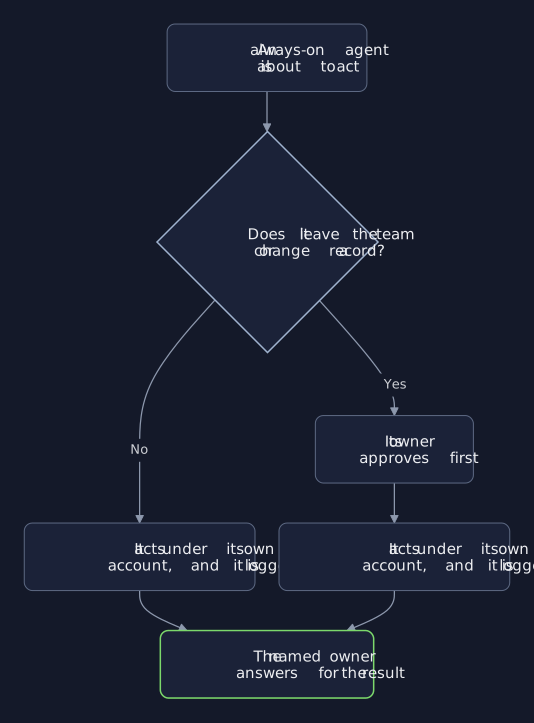
Make three decisions for every always-on agent, whoever bought it:
- What it may do alone. Read, summarize and draft inside one team's work.
- What it must have first. A company account, its own access, an approval line, a log and an off switch, all in place before it touches any of your real work.
- Who owns the result. One named person, the same one who answers for the team's work.
Until it has all three, an agent stays off company chat and email: a pause, not a ban.
What it may do alone
Let it do the work your people dislike and can check quickly: summarize the week's threads, list open tasks, and draft replies a person reads, edits and sends. This work stays inside one team and changes no record. When a draft is wrong, a person sees it first.
What it must have first
Before it runs on real work, each agent needs:
- A company account. Not a personal card, so contract, data terms and spend are visible.
- Its own access. Only the channels and mailboxes its work needs, never a borrowed login.
- An approval line. Anything that leaves the team or changes a record waits for a person.
- A log and an off switch. What it read, did and sent, and one action that stops it.
Where a vendor sells no company plan yet, keep the agent off company chat and email until one exists with data terms you accept. The coverage of the launch makes the approval point too: teams should decide which actions need human approval, particularly when agents can send messages, modify shared files or change production systems.
Who owns the result
When a message leaves the team, the agent sends it from its own account, labeled so every recipient can tell an agent wrote it, and only after its owner approved it. The owner answers for every message it sends. Name one owner per agent: usually the manager who brought it in, since that manager already answers for the team's work. Before the manager changes roles or leaves, a new owner is named, or the agent stops that day.
Bring them in rather than ban them
A ban may only move the practice to personal phones and accounts, where nobody sees it. Ask managers what they already run, with no penalty for telling you. Then move the agents worth keeping onto company accounts, under the three decisions above.
Where an always-on agent runs a core workflow, such as client follow-ups, renewals or supplier exceptions, have it built around your workflow, with experienced engineers beside your team. Your people then decide what it reads, when it waits for approval, and how it changes as the work changes. Pay for the models; keep control of the rules.
When to wait
If nobody can say what an agent can read today, pause it until someone can. Take the inventory of every agent your teams run first; every decision after it is easier.
First steps this week
- Ask what already runs. Each manager lists the agents their team uses.
- Move each one you keep to a company account. Its own, narrowest access and a log.
- Set the approval line. Write down which actions wait for a person, and who that person is.
Bring your list
A fifteen-minute call reviews the agents your managers pay for and names the one needing an owner or approval first. If your controls are already enough, you hear that plainly.
For a core workflow, Engineering builds the agent with your team, along with the approvals, log and controls to manage it, so you own the agent and the controls around it. Where you want a standing second opinion on what your teams adopt, Advisory gives you one.